Download SnowPro Advanced-Architect Certification.ARA-C01.Pass4Success.2026-10-19.58q.vcex
| Vendor: | Snowflake |
| Exam Code: | ARA-C01 |
| Exam Name: | SnowPro Advanced-Architect Certification |
| Date: | Oct 19, 2026 |
| File Size: | 2 MB |
How to open VCEX files?
Files with VCEX extension can be opened by ProfExam Simulator.
Discount: 20%

Demo Questions
Question 1
A company is trying to Ingest 10 TB of CSV data into a Snowflake table using Snowpipe as part of Its migration from a legacy database platform. The records need to be ingested in the MOST performant and cost-effective way.
How can these requirements be met?
- Use ON_ERROR = continue in the copy into command.
- Use purge = TRUE in the copy into command.
- Use FURGE = FALSE in the copy into command.
- Use on error = SKIP_FILE in the copy into command.
Correct answer: D
Explanation:
For ingesting a large volume of CSV data into Snowflake using Snowpipe, especially for a substantial amount like 10 TB, the on error = SKIP_FILE option in the COPY INTO command can be highly effective. This approach allows Snowpipe to skip over files that cause errors during the ingestion process, thereby not halting or significantly slowing down the overall data load. It helps in maintaining performance and cost-effectiveness by avoiding the reprocessing of problematic files and continuing with the ingestion of other data.
Question 2
What is the MOST efficient way to design an environment where data retention is not considered critical, and customization needs are to be kept to a minimum?
- Use a transient database.
- Use a transient schema.
- Use a transient table.
- Use a temporary table.
Correct answer: A
Explanation:
Transient databases in Snowflake are designed for situations where data retention is not critical, and they do not have the fail-safe period that regular databases have. This means that data in a transient database is not recoverable after the Time Travel retention period. Using a transient database is efficient because it minimizes storage costs while still providing most functionalities of a standard database without the overhead of data protection features that are not needed when data retention is not a concern.
Question 3
A company has built a data pipeline using Snowpipe to ingest files from an Amazon S3 bucket. Snowpipe is configured to load data into staging database tables. Then a task runs to load the data from the staging database tables into the reporting database tables.
The company is satisfied with the availability of the data in the reporting database tables, but the reporting tables are not pruning effectively. Currently, a size 4X-Large virtual warehouse is being used to query all of the tables in the reporting database.
What step can be taken to improve the pruning of the reporting tables?
- Eliminate the use of Snowpipe and load the files into internal stages using PUT commands.
- Increase the size of the virtual warehouse to a size 5X-Large.
- Use an ORDER BY
command to load the reporting tables. - Create larger files for Snowpipe to ingest and ensure the staging frequency does not exceed 1 minute.
Correct answer: C
Explanation:
Effective pruning in Snowflake relies on the organization of data within micro-partitions. By using an ORDER BY clause with clustering keys when loading data into the reporting tables, Snowflake can better organize the data within micro-partitions. This organization allows Snowflake to skip over irrelevant micro-partitions during a query, thus improving query performance and reducing the amount of data scanned12.Reference =* Snowflake Documentation on micro-partitions and data clustering2* Community article on recognizing unsatisfactory pruning and improving it1
Question 4
A global company needs to securely share its sales and Inventory data with a vendor using a Snowflake account.
The company has its Snowflake account In the AWS eu-west 2 Europe (London) region. The vendor's Snowflake account Is on the Azure platform in the West Europe region. How should the company's Architect configure the data share?
- 1. Create a share.2. Add objects to the share.3. Add a consumer account to the share for the vendor to access.
- 1. Create a share.2. Create a reader account for the vendor to use.3. Add the reader account to the share.
- 1. Create a new role called db_share.2. Grant the db_share role privileges to read data from the company database and schema.3. Create a user for the vendor.4. Grant the ds_share role to the vendor's users.
- 1. Promote an existing database in the company's local account to primary.2. Replicate the database to Snowflake on Azure in the West-Europe region.3. Create a share and add objects to the share.4. Add a consumer account to the share for the vendor to access.
Correct answer: A
Explanation:
The correct way to securely share data with a vendor using a Snowflake account on a different cloud platform and region is to create a share, add objects to the share, and add a consumer account to the share for the vendor to access. This way, the company can control what data is shared, who can access it, and how long the share is valid. The vendor can then query the shared data without copying or moving it to their own account. The other options are either incorrect or inefficient, as they involve creating unnecessary reader accounts, users, roles, or database replication.https://learn.snowflake.com/en/certifications/snowpro-advanced-architect/
Question 5
An Architect has designed a data pipeline that Is receiving small CSV files from multiple sources. All of the files are landing in one location. Specific files are filtered for loading into Snowflake tables using the copy command. The loading performance is poor.
What changes can be made to Improve the data loading performance?
- Increase the size of the virtual warehouse.
- Create a multi-cluster warehouse and merge smaller files to create bigger files.
- Create a specific storage landing bucket to avoid file scanning.
- Change the file format from CSV to JSON.
Correct answer: B
Explanation:
According to the Snowflake documentation, the data loading performance can be improved by following some best practices and guidelines for preparing and staging the data files. One of the recommendations is to aim for data files that are roughly 100-250 MB (or larger) in size compressed, as this will optimize the number of parallel operations for a load. Smaller files should be aggregated and larger files should be split to achieve this size range. Another recommendation is to use a multi-cluster warehouse for loading, as this will allow for scaling up or out the compute resources depending on the load demand. A single-cluster warehouse may not be able to handle the load concurrency and throughput efficiently. Therefore, by creating a multi-cluster warehouse and merging smaller files to create bigger files, the data loading performance can be improved.Reference:Data Loading ConsiderationsPreparing Your Data FilesPlanning a Data Load
Question 6
Company A would like to share data in Snowflake with Company B. Company B is not on the same cloud platform as Company A.
What is required to allow data sharing between these two companies?
- Create a pipeline to write shared data to a cloud storage location in the target cloud provider.
- Ensure that all views are persisted, as views cannot be shared across cloud platforms.
- Setup data replication to the region and cloud platform where the consumer resides.
- Company A and Company B must agree to use a single cloud platform: Data sharing is only possible if the companies share the same cloud provider.
Correct answer: C
Explanation:
According to the SnowPro Advanced: Architect documents and learning resources, the requirement to allow data sharing between two companies that are not on the same cloud platform is to set up data replication to the region and cloud platform where the consumer resides. Data replication is a feature of Snowflake that enables copying databases across accounts in different regions and cloud platforms. Data replication allows data providers to securely share data with data consumers across different regions and cloud platforms by creating a replica database in the consumer's account. The replica database is read-only and automatically synchronized with the primary database in the provider's account.Data replication is useful for scenarios where data sharing is not possible or desirable due to latency, compliance, or security reasons1. The other options are incorrect because they are not required or feasible to allow data sharing between two companies that are not on the same cloud platform. Option A is incorrect because creating a pipeline to write shared data to a cloud storage location in the target cloud provider is not a secure or efficient way of sharing data. It would require additional steps to load the data from the cloud storage to the consumer's account, and it would not leverage the benefits of Snowflake's data sharing features. Option B is incorrect because ensuring that all views are persisted is not relevant for data sharing across cloud platforms. Views can be shared across cloud platforms as long as they reference objects in the same database.Persisting views is an option to improve the performance of querying views, but it is not required for data sharing2. Option D is incorrect because Company A and Company B do not need to agree to use a single cloud platform.Data sharing is possible across different cloud platforms using data replication or other methods, such as listings or auto-fulfillment3.Reference:Replicating Databases Across Multiple Accounts | Snowflake Documentation,Persisting Views | Snowflake Documentation,Sharing Data Across Regions and Cloud Platforms | Snowflake Documentation
Question 7
How do Snowflake databases that are created from shares differ from standard databases that are not created from shares? (Choose three.)
- Shared databases are read-only.
- Shared databases must be refreshed in order for new data to be visible.
- Shared databases cannot be cloned.
- Shared databases are not supported by Time Travel.
- Shared databases will have the PUBLIC or INFORMATION_SCHEMA schemas without explicitly granting these schemas to the share.
- Shared databases can also be created as transient databases.
Correct answer: A, C, D
Explanation:
According to the SnowPro Advanced: Architect documents and learning resources, the ways that Snowflake databases that are created from shares differ from standard databases that are not created from shares are:Shared databases are read-only. This means that the data consumers who access the shared databases cannot modify or delete the data or the objects in the databases.The data providers who share the databases have full control over the data and the objects, and can grant or revoke privileges on them1.Shared databases cannot be cloned. This means that the data consumers who access the shared databases cannot create a copy of the databases or the objects in the databases.The data providers who share the databases can clone the databases or the objects, but the clones are not automatically shared2.Shared databases are not supported by Time Travel. This means that the data consumers who access the shared databases cannot use the AS OF clause to query historical data or restore deleted data.The data providers who share the databases can use Time Travel on the databases or the objects, but the historical data is not visible to the data consumers3.The other options are incorrect because they are not ways that Snowflake databases that are created from shares differ from standard databases that are not created from shares. Option B is incorrect because shared databases do not need to be refreshed in order for new data to be visible.The data consumers who access the shared databases can see the latest data as soon as the data providers update the data1. Option E is incorrect because shared databases will not have the PUBLIC or INFORMATION_SCHEMA schemas without explicitly granting these schemas to the share.The data consumers who access the shared databases can only see the objects that the data providers grant to the share, and the PUBLIC and INFORMATION_SCHEMA schemas are not granted by default4. Option F is incorrect because shared databases cannot be created as transient databases. Transient databases are databases that do not support Time Travel or Fail-safe, and can be dropped without affecting the retention period of the data.Shared databases are always created as permanent databases, regardless of the type of the source database5.Reference:Introduction to Secure Data Sharing | Snowflake Documentation,Cloning Objects | Snowflake Documentation,Time Travel | Snowflake Documentation,Working with Shares | Snowflake Documentation,CREATE DATABASE | Snowflake Documentation
Question 8
The following DDL command was used to create a task based on a stream:
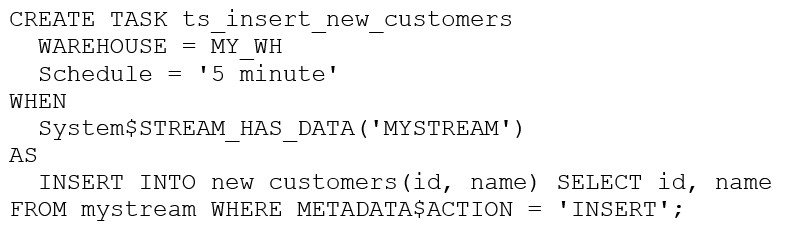
Assuming MY_WH is set to auto_suspend -- 60 and used exclusively for this task, which statement is true?
- The warehouse MY_WH will be made active every five minutes to check the stream.
- The warehouse MY_WH will only be active when there are results in the stream.
- The warehouse MY_WH will never suspend.
- The warehouse MY_WH will automatically resize to accommodate the size of the stream.
Correct answer: B
Explanation:
The warehouse MY_WH will only be active when there are results in the stream. This is because the task is created based on a stream, which means that the task will only be executed when there are new data in the stream. Additionally, the warehouse is set to auto_suspend - 60, which means that the warehouse will automatically suspend after 60 seconds of inactivity. Therefore, the warehouse will only be active when there are results in the stream.Reference:[CREATE TASK | Snowflake Documentation][Using Streams and Tasks | Snowflake Documentation][CREATE WAREHOUSE | Snowflake Documentation]
Question 9
Which organization-related tasks can be performed by the ORGADMIN role? (Select three.)
- Changing the name of an account
- Viewing a list of organization accounts
- Creating an account
- Deleting an account
- Changing the name of the organization
- Enabling the replication of a database
Correct answer: B, C, F
Explanation:
According to the SnowPro Advanced: Architect documents and learning resources, the organization-related tasks that can be performed by the ORGADMIN role are:Creating an account in the organization.A user with the ORGADMIN role can use the CREATE ACCOUNT command to create a new account that belongs to the same organization as the current account1.Viewing a list of organization accounts.A user with the ORGADMIN role can use the SHOW ORGANIZATION ACCOUNTS command to view the names and properties of all accounts in the organization2.Alternatively, the user can use the Admin Accounts page in the web interface to view the organization name and account names3.Enabling the replication of a database. A user with the ORGADMIN role can use the SYSTEM$GLOBAL_ACCOUNT_SET_PARAMETER function to enable database replication for an account in the organization.This allows the user to replicate databases across accounts in different regions and cloud platforms for data availability and durability4.The other options are incorrect because they are not organization-related tasks that can be performed by the ORGADMIN role. Option A is incorrect because changing the name of the organization is not a task that can be performed by the ORGADMIN role.To change the name of an organization, the user must contact Snowflake Support3. Option D is incorrect because changing the name of an account is not a task that can be performed by the ORGADMIN role.To change the name of an account, the user must contact Snowflake Support5. Option E is incorrect because deleting an account is not a task that can be performed by the ORGADMIN role. To delete an account, the user must contact Snowflake Support.Reference:CREATE ACCOUNT | Snowflake Documentation,SHOW ORGANIZATION ACCOUNTS | Snowflake Documentation,Getting Started with Organizations | Snowflake Documentation,SYSTEM$GLOBAL_ACCOUNT_SET_PARAMETER | Snowflake Documentation,ALTER ACCOUNT | Snowflake Documentation, [DROP ACCOUNT | Snowflake Documentation]
Question 10
At which object type level can the APPLY MASKING POLICY, APPLY ROW ACCESS POLICY and APPLY SESSION POLICY privileges be granted?
- Global
- Database
- Schema
- Table
Correct answer: A
Explanation:
The object type level at which the APPLY MASKING POLICY, APPLY ROW ACCESS POLICY and APPLY SESSION POLICY privileges can be granted is global. These are account-level privileges that control who can apply or unset these policies on objects such as columns, tables, views, accounts, or users. These privileges are granted to the ACCOUNTADMIN role by default, and can be granted to other roles as needed. The other options are incorrect because they are not the object type level at which these privileges can be granted. Database, schema, and table are lower-level object types that do not support these privileges.Reference:Access Control Privileges | Snowflake Documentation,Using Dynamic Data Masking | Snowflake Documentation,Using Row Access Policies | Snowflake Documentation,Using Session Policies | Snowflake Documentation
HOW TO OPEN VCE FILES
Use VCE Exam Simulator to open VCE files
HOW TO OPEN VCEX AND EXAM FILES
Use ProfExam Simulator to open VCEX and EXAM files
ProfExam at a 20% markdown
You have the opportunity to purchase ProfExam at a 20% reduced price
Get Now!